
If there is an issue where a user account cannot sign in and the OS password was recently changed please try the following.
- Go to dash.v2cloud.com and click on the cloud computer name.
- On the user profile click on actions and reveal OS password.
- Copy the OS password and login to the cloud computer as administrator.
- Open computer management.
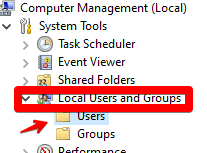
- Go to Local Users and Groups and select users
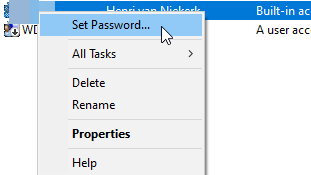
- Right click on the affected user and select set password
- Paste the password from the dashboard there.
- The user should now be able to connect.
Tags: User login issue, user cannot login