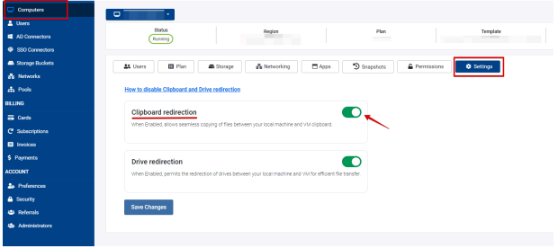
To enable copy-paste functionality between a local PC and a V2 Cloud computer from the
dashboard, follow these steps:
1. Log in to the V2 Cloud Dashboard: Go to the V2 Cloud dashboard and log in with your
credentials.
2. Select the Appropriate Cloud Computer: Navigate to the "Computers" tab. Select the cloud
computer where you want to enable copy-paste functionality.
3. Open the Settings: Once the cloud computer is selected, click on the "Settings" gear icon.
4. Enable Clipboard Redirection: In the settings menu, look for an option related to "Clipboard
redirection" functionality. Toggle the switch to enable clipboard sharing between the local PC
and the cloud computer.
5. Save the Changes: After enabling clipboard redirection, ensure to save the settings.