
Open any Office application and check the following image: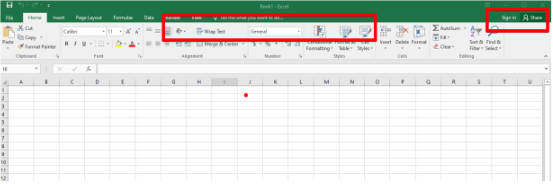
At the top right check if you are signed in and that there’s no license error showing at the
top-mid of the screen.
O365 Web version will work on any type of cloud computer.
For Teams cloud desktops you’d need one of the following licenses
– Microsoft 365 E3
– Microsoft 365 E5
– Microsoft 365 Apps for enterprise (supported until October 2025)
– Microsoft 365 Business Premium
If it’s a single user desktop all licenses will work.
If the license can’t be activated on a single user because it says the license is not good for
shared environments, check the following under registry:
This only works for Single user cloud computers, not for multi-user cloud computers.
Go to Start , type Regedit and enter the Regedit:
Go to:
HKEY_LOCAL_MACHINE\SOFTWARE\Microsoft\Office\ClickToRun\Configuration
Check for the string value of SharedComputerLicensing , if it’s 1, change it to 0 if it’s a Single
User cloud computer. Try again to login on any office application.
Related to