
You can restrict connections to only the V2 dashboard (Browser) and the V2 desktop app. This way you'll block incoming connection requests to the port 3389 done from a 3rd party RDP application (such as Microsoft Remote Desktop)
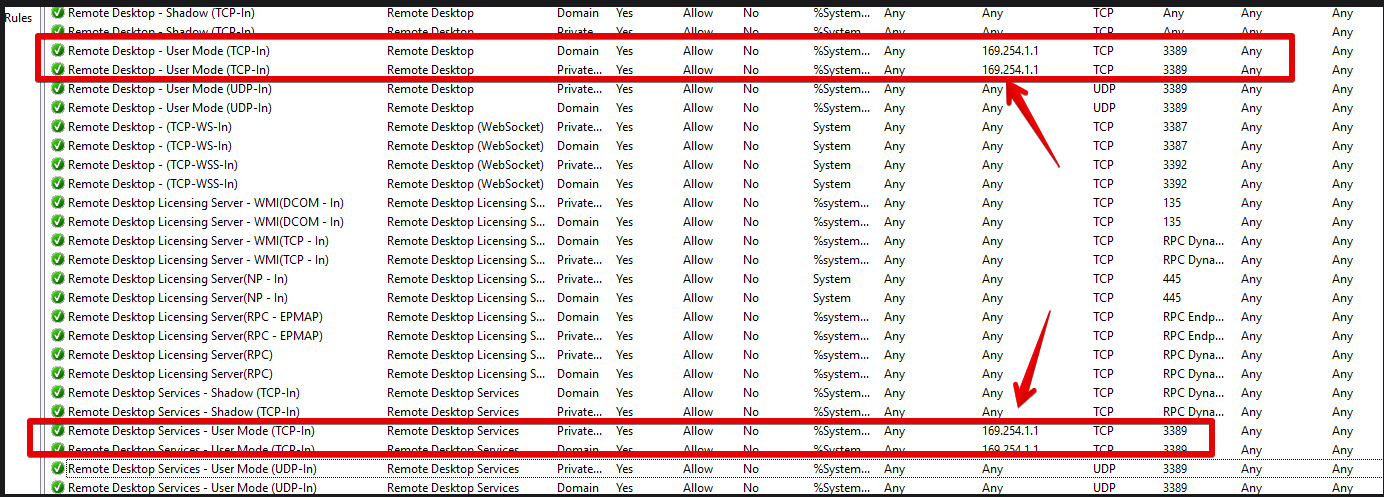
To block public IP RDP access , go to the Windows Firewall , Inbound connections, and adjust the following rules:
1- Remote desktop user mode TCP-IN
2- Remote desktop services User mode TCP-IN
If the same rule shows more than one, it's because of the network type the rule is created for.
modify the scope and add remote address 169.254.1.1
If you need our assistance, please send us an email with the request to support@v2cloud.com
Related to