
When the admin/user trying to send email message from another application receive warning in Outlook
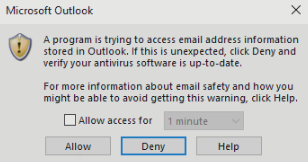
In Outlook in Trust Center Settings need to check "Never worm me about suspicious activity"
Under the user without Administrator permission in Windows this option is grey out
Steps on how to check the "Never warn me about subscription activity" on the user account without Administrator privileges in Windows.
Step 1
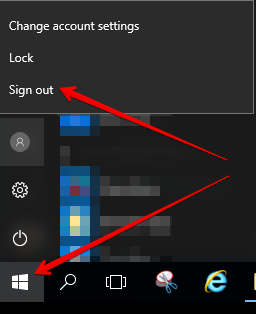
Save all opened documents and Sign out (not Disconnect) the affected user from the Windows session
Step 2
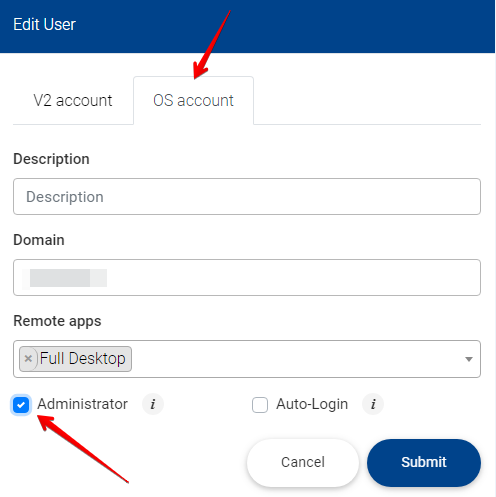
Submit the affected user from the V2 Dashboard as Administrator in Windows
Action - Edit user -> check Administrator -> Submit
Wait 1 minute so the task ends in our background
Step 3
Log in to the user Windows Desktop
IMPORTANT -> Run Outlook as Administrator
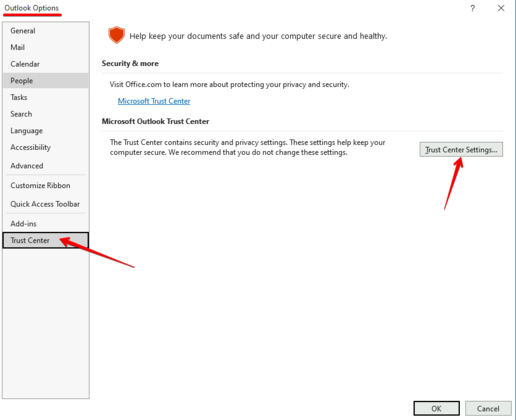
In Outlook Go to
File -> Options -> Trust Center -> Trust Center Settings
Step 4
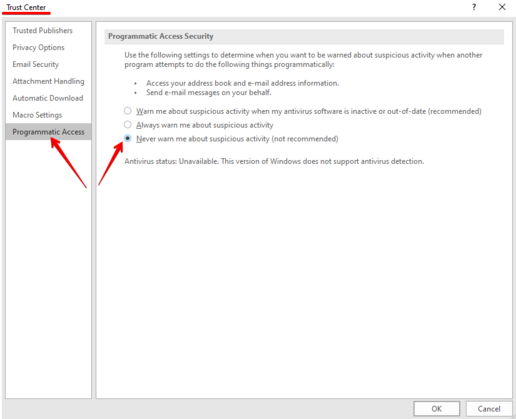
Select Programmatic Access from the left and
Check -> Never warn me about suspicious activity -> Ok
Step 5
Sign out the user from the Windows session
Remove the Administrator permission for the user in Windows from the V2 Dashboard
Action - Edit user -> uncheck Administrator -> Submit.
Wait 1 minute so the task ends in our background
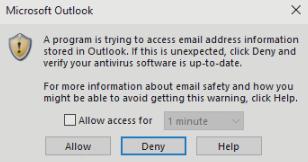
When the task is done, the user will not see any more the following popup
Related to